


In this article
In this article
An Authorization for Expenditure (AFE) is the formal request that authorizes funding for a capital project and sets its cost baseline before spending begins. It carries the scope, the justification, the financial analysis and the approval trail the decision rests on.
Depending on your industry, the same decision goes by a different name.
- Capital Expenditure Request (CER)
- Project Approval Request (PAR)
- Capital Appropriation Request (CAR)
- Request for Appropriation (RFA)
Different name, same moment: the point a plan becomes executable.
In oil and gas, an AFE is a cost proposal an operator sends its joint venture partners to approve their share of a well, with working interests, ballots and non-consent penalties attached. That is a world of its own and it is not what this blog covers. This is about the AFE that other asset-intensive businesses run: the general capital authorization step that sits between “we have planned to do this” and “we are approved to spend the money.”
“How are AFE’s handled in SAP?”
SAP’s closest native object is the appropriation request in SAP Investment Management (IM), and that is a pre-investment planning record rather than a fully formed business case. So, the AFE has to be built around it. There are six ways organizations try and accommodate the AFE process in SAP environments and most of them fail for reasons worth understanding. These are discussed later. The real decision comes down to two fundamental choices: build that front end on your own SAP stack or buy one that is ready to run.
What’s the Difference Between an AFE, a CER, and a CAR?
If your company calls it a CER and the organization you just acquired calls it an AFE, you are both describing the same thing. An AFE, a CER, a CAR, an RFA, an appropriation request: same decision, different letterhead.
The label is a matter of industry and heritage. Oil, gas and mining tend to say AFE. Manufacturing, food and general corporate tend to say CER or capital appropriation request. Finance-led organizations lean toward CAR and RFA. Underneath every one of them is the same moment: the point a capital investment plan turns into money a project manager is approved to spend.
Comparing AFE vs CER vs CAR
Here is how each term maps to the SAP object behind it.
| The Term | Where It’s Used | What It Does | Relationship to SAP |
|---|---|---|---|
| AFE (Authorization for Expenditure) | Oil, gas, mining, and heavy industry | Formal authorization of capital spend against a cost baseline | No native SAP object. The appropriation request is the closest fit, but it does not cover the full job. |
| CER (Capital Expenditure Request) | Manufacturing, food, and general corporate | The same authorization request under a different name | Same as above |
| CAR (Capital Appropriation Request) | General corporate, finance-led | The same request, appropriation-framed | Same as above |
| RFA (Request for Appropriation) | General corporate, finance-led | The same request, appropriation-framed | Same as above |
| Appropriation Request | SAP Investment Management | SAP’s native pre-investment planning object | This is the SAP object itself. It carries the planning record, not the full business case. |
What Does an Authorization for Expenditure Need to Contain?
An AFE asks someone to commit money that will sit on the balance sheet for many years. This critical decision is based on a document they will read once, for a few minutes, alongside other requests competing for the same budget. Everything in it exists to make that decision defensible.
At its core, the AFE is the business case for final expenditure approval. It carries justification, setting out what the investment delivers and what happens if it does not proceed. It shows the alternatives that were considered and why the preferred option won, because an approver who cannot see the rejected options is being asked to ratify a decision rather than make one. It brings the evidence behind the numbers, the quotes, estimates, engineering studies, risk assessments and compliance requirements. And it routes through a workflow that puts it in front of the right authority levels in the right order, recording who approved what and when.
That is the AFE as most organizations understand it, and all of it fits in a document. Which is precisely why so many AFEs still live in a spreadsheet. Forecast expenditures, hopeful savings projections and net present value (NPV) calculations are what a spreadsheet does well. However, long-texts, supporting documents, audit trails and consistency are not so much.
Why an AFE Is More Than a Form
What a spreadsheet cannot hold is everything the request needs to be connected to.
Start with the money. An AFE draws against a budget that was set during capital planning, so the approver needs to know what remains in that budget line at the moment of approval, not what remained when someone last refreshed the file. Where capital is approved as a pool and drawn down by sub-projects, the request itself has to hold an allocation it can redistribute. A number typed into a cell cannot do either of those things. It can only report what was true when it was typed.
Then comparability. NPV, IRR, payback and whole-of-life cost have to be calculated the same way for every request, or two proposals from two business units cannot be put side by side. Timing belongs in that calculation as well, because a project that slips two quarters has a different return profile and the analysis should say so. On top of the financials sits the scoring: strategic alignment, risk, benefit and compliance, weighted against criteria your organization defines and expresses in your own classifications. That is what turns a queue of requests into a ranked portfolio instead of a series of individual approvals granted in the order they happened to arrive.
History matters too. When a supplementary request arrives, the approver needs the original approval, every drawdown since, and actual spend to date, together in one view. Approving a supplement without that context is guesswork, and supplements are where capital discipline is most often lost.
The AFE must also show its dependencies. Which supplier, which internal resources, which existing asset is being replaced or extended. Those dependencies determine whether the project is deliverable at all, and they may change while the request is in flight. A standalone form has no way of knowing that the resource it assumed was available has been committed elsewhere.
Finally, it must be usable by the people who use it least. The executives approving the largest sums touch the system a handful of times a quarter. If approval means navigating transaction codes in SAP GUI, one of two things happens. The approval does not happen, or it happens without anyone reading the case. Neither is control.
Why Don’t SAP Appropriation Requests Work as an Authorization for Expenditure?
SAP provides appropriation requests as part of SAP Investment Management (IM). They hold the pre-investment planning record, and once approved, investment measures (WBS elements and internal orders) are automatically created. So why do most teams work around them?
Appropriation requests are seldom implemented as the AFE solution, for seven reasons:
- User experience. There is no Fiori app. Appropriation requests run in SAP GUI with little configurability, and for an executive who approves capital a few times a year that is a barrier. It is where the workaround usually begins.
- Data model configurability. Limited scope to extend the data model, so an organization’s own evaluation criteria and classifications rarely fit.
- Financial analysis. Basic metrics only, with no activity scheduling or dependencies, which are precisely the things that delay projects and defer returns.
- Scoring and ranking. No risk assessment, strategic alignment or benefit scoring, so approvers have no basis on which to rank competing requests and end up approving them one at a time in the order they arrive.
- Links to suppliers, resources and assets. Supplier and internal resource dependencies sit outside the object’s scope, as do links to the assets being replaced or enhanced.
- Links to previous approvals. For a supplementary request, the original allocation, the drawdowns and actual spend to date are not put in front of the approver at the moment of decision.
- Pool budgets. Sub-project drawdown is not supported, because an appropriation request carries no budget allocation of its own to redistribute.
Individually these are gaps. Together they describe an object that holds the planning record but cannot carry the business case, which is the fuller argument for why SAP appropriation requests aren’t enough on their own.
That is not a criticism of the appropriation request, which does what it was designed to do. The difficulty is what it takes to make it do more. For decades, running the AFE inside SAP meant implementing Investment Management around it, with SAP Project System (PS) for execution and often SAP Portfolio and Project Management (PPM) for portfolio evaluation. A substantial footprint for one approval step, and the limitations of standard SAP Investment Management mean the financial analysis gap stays open regardless.
Previously, using appropriation requests in SAP was the only option. It is not your only choice anymore.
How SAP’s Approach to Capital Approvals Has Changed
SAP now publishes a second pattern. In its CapEx workflow package, the request, the approval routing and the supporting documentation are handled outside the core in the Business AI Platform (BAIP, previously termed BTP), while S/4HANA remains the system of record for the project, the WBS, the budget and the accounting status. Approvers are determined dynamically by decision rules against attributes like amount and company code, and the outcome posts back to S/4HANA to release or reject the underlying investment object.
That follows SAP’s clean core mandate: extend through released APIs and events rather than replicating SAP functionality, so the core stays standard and upgradable. Applied to capital authorization, the business case, the scoring and the approval trail belong in an extension. The financial record belongs in SAP.
So, the question stopped being whether the AFE belongs inside SAP. It is now which extension pattern you choose, and whether SAP stays your system of record when you do.
Which leaves most SAP-run organizations somewhere they will recognize. You can have an approved AFE, a capital budget and a complete SAP landscape, and still not answer the two questions that matter: what is the expected return on your current capital portfolio, and are you on track?
What Are the Options for Handling AFEs in SAP?
There are six ways that SAP customers handle this today, described in the table below.
| The Option | What You’re Choosing | When It Fits |
|---|---|---|
| Standard modules (IM, PS, PPM) | A configuration project across three SAP components | Capital governance is straightforward, participants already work in SAP, and the approval step does not need to carry evaluation or scoring |
| Bespoke BAIP build | A development project and a permanent maintenance obligation | Strong internal development capability and a deliberate preference for building |
| Fiori packaged solution (IQX CAPEX) | A lighter build on your own SAP technology stack, with complete data control | Highly specific or complex CapEx processes, on-premise affinity, everything on the SAP stack |
| SaaS bolt-on (Stratex Online) | A product, ready to run, integrated deeply with SAP | Comprehensive capital planning, budgeting and approval capability without a build |
| Analytic Platform Adaption | Re-purpose your analytical tools for business case development and approval | FP&A team seek to use their core tool to solve all their process needs |
| Excel and disconnected tools | Manual connection to every system the AFE depends on | Low volume/value or capital planning and control is not critical to strategic success |
Why Excel, Custom Builds, and Existing Systems Fall Short
Before comparing the serious contenders, four approaches can be quickly dealt with:
- Excel: A stand-alone Excel or SharePoint AFE process is manually connected to every planning, execution and financial system it depends on, and each connection is a person retyping a number. Old versions get referenced, formulas break silently, the edit history is indeterminate, and the decision that commits the largest sums in the business ends up in the least controllable software in the building.
- A bespoke build: SAP’s published CapEx workflow package gives you a head start on the SAP Business AI Platform (BAIP), which now brings together SAP Business Technology Platform and its sibling services, and the head start is where the help ends. The build, the integration, the roadmap and the maintenance are all yours, indefinitely. That is a reasonable trade when the process is a source of competitive advantage. Capital authorization is not.
- Your project management system: MS Project Online and its equivalents handle task definition, resource planning and execution. They are not financial systems, and they have no deep financial concepts: fiscal years, CapEx versus OpEx, multi-currency translation, lease versus buy analysis.
- Your analytics platform: SAP Analytics Cloud and Anaplan are good repositories of capital plans, budgets and actuals, and they are too financially focused for the job of the AFE. Supporting documentation, textual justification, scoring and ranking, and workflow collaboration are inadequately supported. EPM tools rarely solve the spreadsheet problem either. AFP’s 2025 benchmarking research found that 71% of finance teams had EPM platforms in place, with spreadsheets still used to prepare data for them (82%), work alongside them (85%) and bypass them entirely (57%).
That leaves three options: the standard SAP modules, a packaged Fiori solution on your own stack, and a SaaS solution integrated deeply with SAP.
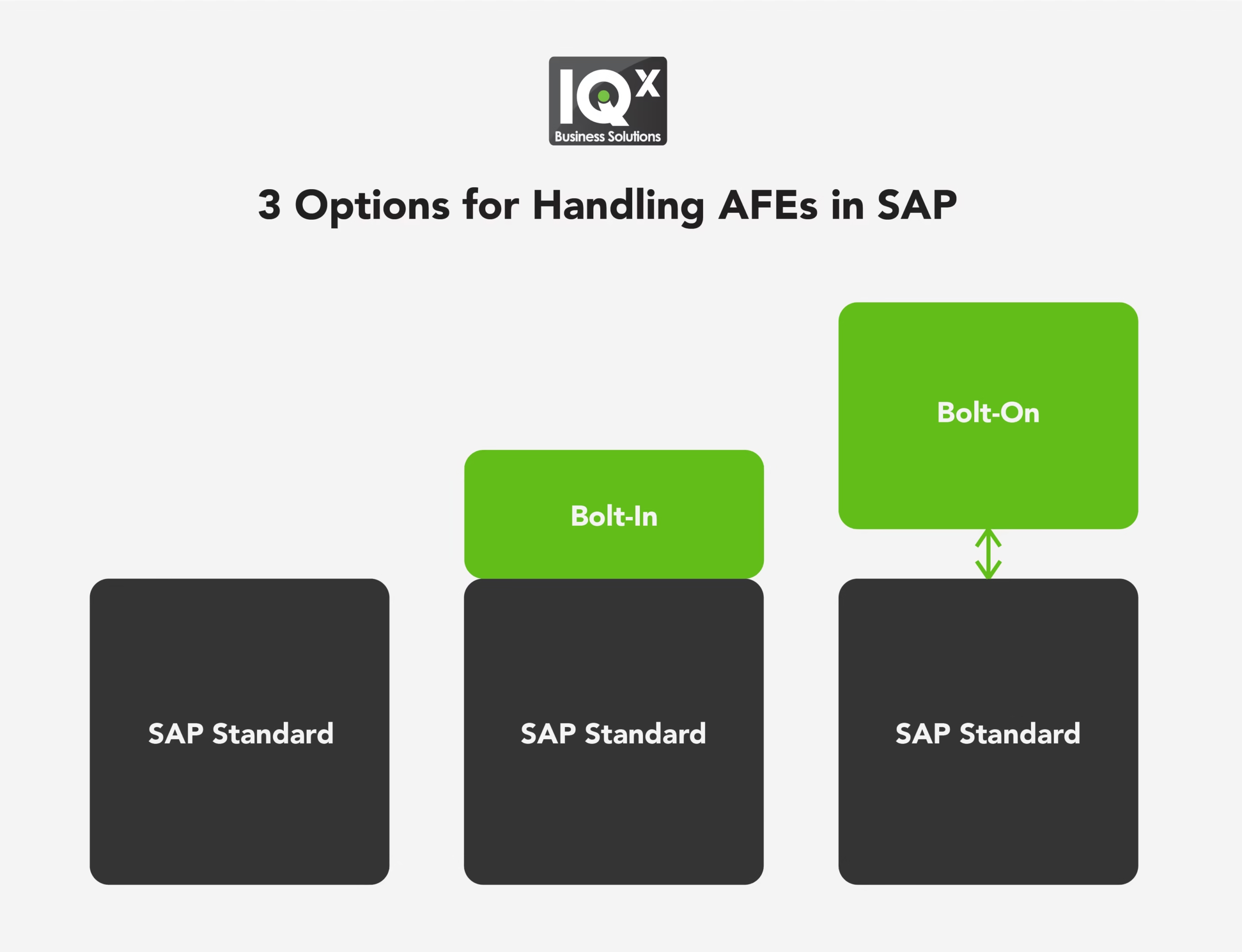
Bolt-in or Bolt-on?
Assuming that SAP IM Appropriation Requests are not suitable ‘out the box’, two core options remain, and the choice between them is not really about features. Both can support the AFE process. The difference is whether you build that capability or buy it.
Whichever way you go, the answer has to deliver five things:
- Transparency of process status, so anyone can see where a request is at
- Consistency of evaluation and ranking across business units
- Agility to re-prioritize as circumstances change
- Traceability of plans and budgets through execution
- Governance of approvals and supplements
Judge them against how each one handles the CapEx approval process in SAP.
| Standard | Bolt-in (IQX CAPEX) | Bolt-on (Stratex Online) | |
|---|---|---|---|
| What It Is | SAP Investment Management, Project System and Portfolio and Project Management, configured | A front end on your SAP technology stack, with workflow and data extensions | SaaS with deep SAP integration |
| Benefits | Natively integrated portfolio and investment management functionality | More user-friendly, more flexible, complete data control | Most comprehensive option, not constrained by SAP functionality, data models or workflows. Ready to run |
| Costs | User experience and flexibility, and still no financial analysis or impact analytics | Development cost, implementation duration, limited overall process control | Security and data residency review. Validate default integration design and data mapping at implementation |
| System of Record | SAP | SAP | SAP |
All three keep SAP as the system of financial record, and that is what separates them from the four already ruled out, and it is the test to apply to anything else you evaluate.
The standard modules and a Fiori packaged solution have a lot in common. Both run inside your SAP landscape, governed by the controls and the security model you already operate. Both are projects: one a configuration exercise across three components, the other a fast-start customization build on your own stack. Both put the work, and the timeline, in your court.
A bolt-on differs in two respects:
- It is ready to run. There is no build, and no dependency on SAP’s data models, workflows or functional scope. What the AFE has to support, the scoring, the financial analysis, the supplementary history, the pool budgets, is already there rather than something you specify and wait for. This is how Stratex Online handles the AFE as the front end to SAP.
- Your capital planning data sits outside the SAP landscape. That means an information security, data residency and vendor assurance review before deployment. It is real work. It is also the same assessment already applied to every other cloud application you run The financial record, however, stays in SAP.
What Changes When SAP Stays the System of Record
Keeping SAP as the system of record gets you out of reconciliation. The amount authorized on the AFE is the amount in SAP, not a figure stitched together from three spreadsheets the night before. No re-keying, no quarterly argument about which number is real, and no two business units funding the same thing because neither could see the other’s request. A lean team spends its time on analysis instead of on making the numbers agree.
A front end for capital planning does more than house the AFE. It makes every capital decision traceable from idea to benefit realization. It gives finance and the portfolio owner the same picture at the same moment. It turns “where did that money go” from a two-day investigation into a single click. An AFE with a home is one line on that list.
That works because approval is a trigger rather than a conclusion. Once the AFE is approved, the project WBS element or internal order is created automatically. Commitments and actuals start landing against the approved baseline. The project runs, costs settle, and the asset is capitalized. Financial analysis data is automatically updated in the capital planning system. No number is re-typed at any point, because nothing has to leave the system it was approved in.
Which keeps the AFE answerable long after the fact. Who approved it, against which business case, and how far actual cost or schedule has drifted from the baseline are questions with one place to look. When a supplementary request arrives eight months later, the original approval, the drawdowns since and the spend to date are all in front of the approver at the moment of decision.
Approving capital fast was never the hardest part. Being able to see capital allocation, defend it and change your mind about it a year later is.
So even when your AFE lives outside the appropriation request, SAP stays the financial record. The decision is shaped, evaluated and authorized in one place, the execution happens in SAP, and the financial record was never anywhere else. An AFE was never a form to file. It is a baseline you carry all the way to the asset on your balance sheet. Kept alive and connected, authorization for expenditure stops being paperwork. It becomes the moment you decided, on the record, and still in control.
FAQs on Authorization for Expenditure (AFE)
Related Posts
If you enjoyed reading this, then please explore our other articles below:


